CHOOSE A COURSE · PLAN THE WORK
Build your course learning path
Choose a course for the work you want to do. Then check whether its workload fits your week.
Start with a task you want to complete
Write down an observable result before you compare course descriptions. For a coding course, that might mean reading a file and producing a useful summary. For a design course, it might mean explaining a layout through a finished project. Use the task to identify the knowledge you need, the work you must practise, and the feedback you want.
Read the prerequisites before you enrol. Try a sample exercise without following the answer. If the instructions depend on unfamiliar ideas, add an introductory course to your path. If the exercise feels familiar, inspect the later assignments before you spend time repeating material. Keep the course that addresses your next missing skill.
Course workload planner
Enter the provider's total study estimate, not just the video duration. Add only practice or project time that the estimate excludes. Use the hours you can protect each week. Results update as you type.
Use quarter-hour increments. Course and extra hours each accept 0–10,000. Weekly hours accept 0.25–168. These are input limits, not study recommendations.
Method: total hours = course hours + extra hours. Planned weeks = total hours ÷ weekly hours, rounded up. This estimates workload, not mastery. It assumes steady weekly availability and excludes holidays. The calculator runs locally and does not send your entries to a server.
Example: a 9-hour course plus your own 3-hour practice allowance gives 12 hours. At 3 hours per week, that needs 4 weeks. The allowance is an illustration, not a research recommendation. Change it to match your project.
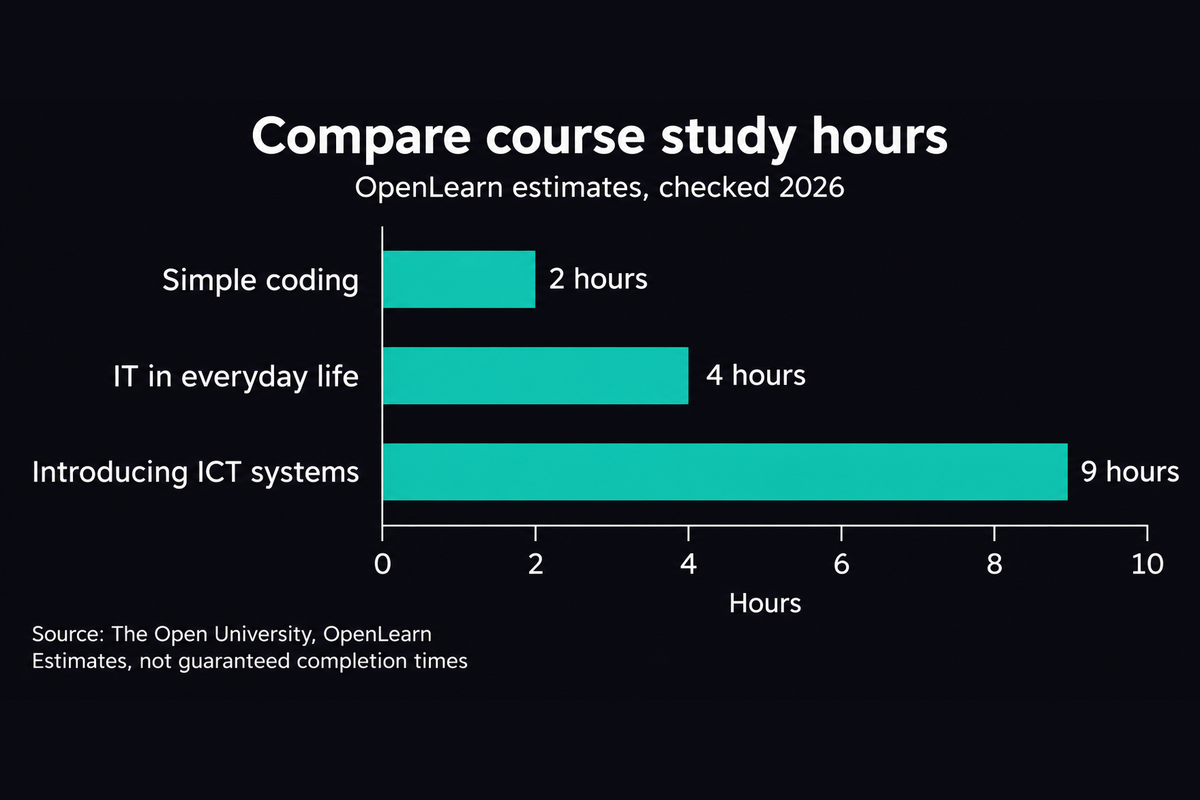
The chart compares workloads, not quality or a required sequence. Information and communication technology is abbreviated as ICT. Sources: OpenLearn, “Simple coding,” “IT in everyday life,” and “Introducing ICT systems” (checked 2026).
Compare what the course asks you to do
Make a short comparison sheet for your options. Copy the stated learning outcomes and match them against your task. Look for work that lets you demonstrate the skill, rather than relying on the course title. Check these details before you choose:
- Prerequisites: identify the knowledge, equipment, and software you need before you start.
- Assignments: check whether you will solve problems, write explanations, or produce a project.
- Feedback: find out whether an instructor, another learner, or an automatic checker reviews your work.
- Access: check the schedule, content availability, captions, and download options.
- Costs: check the total price and whether assessments, required software, or a certificate cost extra.
Treat a missing detail as a question for the provider. Do not assume that a completion certificate meets an employer's requirements. Ask the employer what evidence they accept before you choose a course mainly for its certificate.
Put your learning path in a useful order
Arrange your choices by prerequisites. Put the course that teaches the necessary vocabulary before the course that expects you to use it. Next, choose work that applies the idea in a small task. Finish with a project that resembles your original goal. Avoid collecting overlapping introductory courses without attempting the work yourself.
Keep a simple record of what you can do without the lesson open. Save your project files, short explanations, and questions that remain unanswered. Use these records to decide whether to continue, repeat a difficult section, or change the next course. They make your next choice more specific.
Reserve time for practice and review
The Institute of Education Sciences guide, Organizing Instruction and Study to Improve Student Learning (2007), recommends spacing learning over time. It also recommends alternating worked examples with problem solving and using quizzes to revisit key content.
Apply those ideas by returning to earlier material and trying a task before you inspect the solution. This page uses the guide for general study principles. It does not derive a fixed practice allowance or completion date from the research.
After you begin, compare the time you actually use with your estimate. Adjust the remaining course hours when assignments take longer than expected. If your available time falls, reduce the workload or extend the schedule. Keep the plan realistic enough to use during an ordinary week.
Source: Institute of Education Sciences, U.S. Department of Education, 2007. Course workload sources: The Open University, OpenLearn, checked 2026. Search the exact course titles on OpenLearn to inspect the current course details.